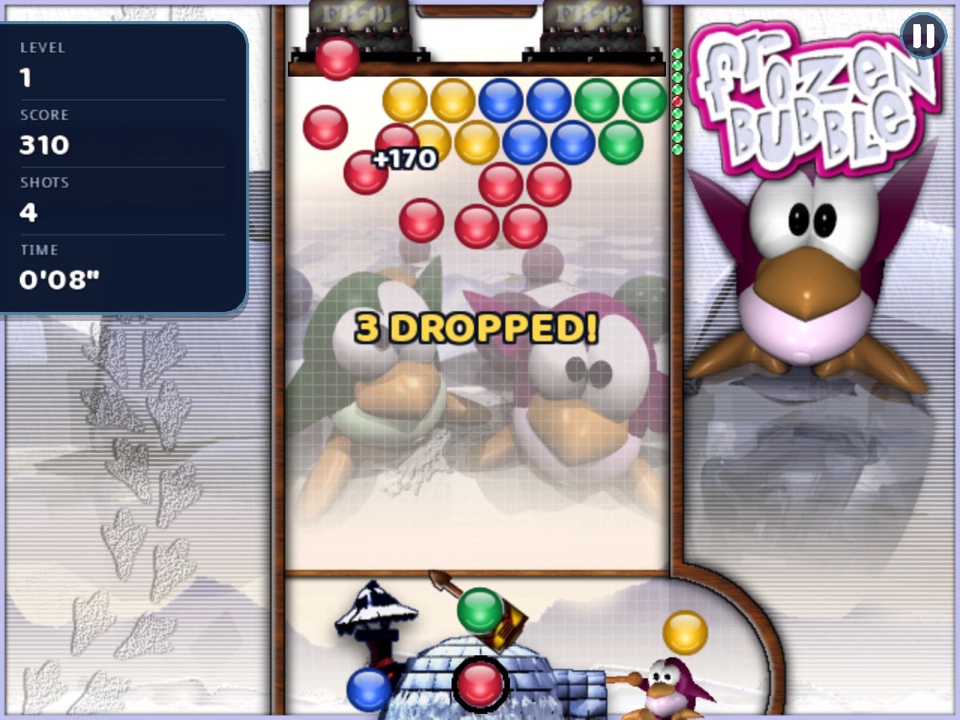
Frozen Bubble is an arcade puzzle game about aiming. A cluster of coloured bubbles hangs from the top of a narrow well, and a penguin at the bottom works a launcher that fires one bubble at a time. Your job is to clear the cluster before it reaches the bottom. This page covers the rules of the 1-player game and the controls on every platform; the strategy guide goes further into how to play well, and multiplayer explains what changes when you play against other people.
Every level starts with a pattern of bubbles stuck to the ceiling. You win the level when the last bubble is gone. You lose when any bubble sits below the line near the bottom of the well, just above the launcher. There is no time limit on a level as a whole, but there is a limit on how long you can wait between shots (see Hurry below), and the ceiling itself keeps coming down.
The bubble in the launcher flies in a straight line in the direction you aim it, bounces off the side walls, and sticks to the first bubble (or the ceiling) it touches. If it lands touching two or more bubbles of its own colour, so that three or more of that colour are now connected, the whole connected group pops.
Popping is only half of it. Any bubbles that were hanging from the group you just popped, and are no longer connected to the ceiling through other bubbles, fall off the board. Those dropped bubbles are worth more than popped ones, and a single well-placed shot that cuts a big cluster loose can clear half the screen.
A bubble that touches no matching group simply sticks where it lands. That is not always a wasted shot: placing bubbles deliberately, to build a group you will pop later, is a large part of the game.
Below the launcher you can always see the next bubble, the one that will be loaded after you fire. Its colour is chosen from the colours still on the board, so once a colour is cleared completely it stops coming.
This version adds a pocket beside the next bubble, called Swap. Press the Swap button when the pocket is empty and the loaded bubble goes into it, the next bubble moves up into the launcher, and nothing is fired. Press Swap again later and the pocketed bubble is fired in place of the loaded one, which goes into the pocket in turn. Swap lets you hold on to a colour you know you will need, or get rid of one that has no good place to go. The pocket empties at the start of each level. The game's own How to play page, in the 1-player menu, shows the launcher, the next bubble and the pocket labelled with your own controls.
In the 1-player game the ceiling is pushed down by one row after every nine shots, taking every bubble with it. A row of lights warns you as it gets close: they speed up on the last shot before it moves. The further down the ceiling gets, the less room you have, so clearing a level quickly matters even before you think about points.
You cannot wait forever. If you hold a shot too long a HURRY! sign appears, and if you still do not fire the launcher fires on its own in whatever direction it is pointing. In the 100-level campaign the warning comes after about eight seconds and the forced shot at about ten and a half; in random levels, multiplayer training and every multiplayer game both come sooner, at about five and seven and a half seconds.
The original game only counted how far you got. This version also keeps points in 1-player games:
A "+N" floats up from where each scoring shot lands, and the level-cleared card shows how long the level took and the bonus it earned. Losing a life sets your score back to zero, which is why the online board for points records the best single life rather than the run.
| Action | Keyboard (player 1) | Gamepad | Mouse | Touch |
|---|---|---|---|---|
| Aim | Left / Right arrows | D-pad or stick | Point | Touch the board |
| Fire | Up arrow | A | Left click | Release |
| Centre the launcher | Down arrow | |||
| Swap | Right Shift | X | Right click | Tap below the board |
| Pause | P | Start | Pause button | Pause button |
| Menu | Menu button | Menu button |
Mouse and touch aim are switched on in the settings. Every key can be changed under CONTROLS & SETTINGS, or during a game from the menu button at the top left, which also has sound and music switches and a way back to the title screen. On a phone or tablet, hold the device sideways: the game is drawn for a wide screen.
Once the first few levels feel easy, read the strategy guide for bank shots and how to set up big drops. The game modes page lists everything else there is to play, from endless random levels to four-way online battles.