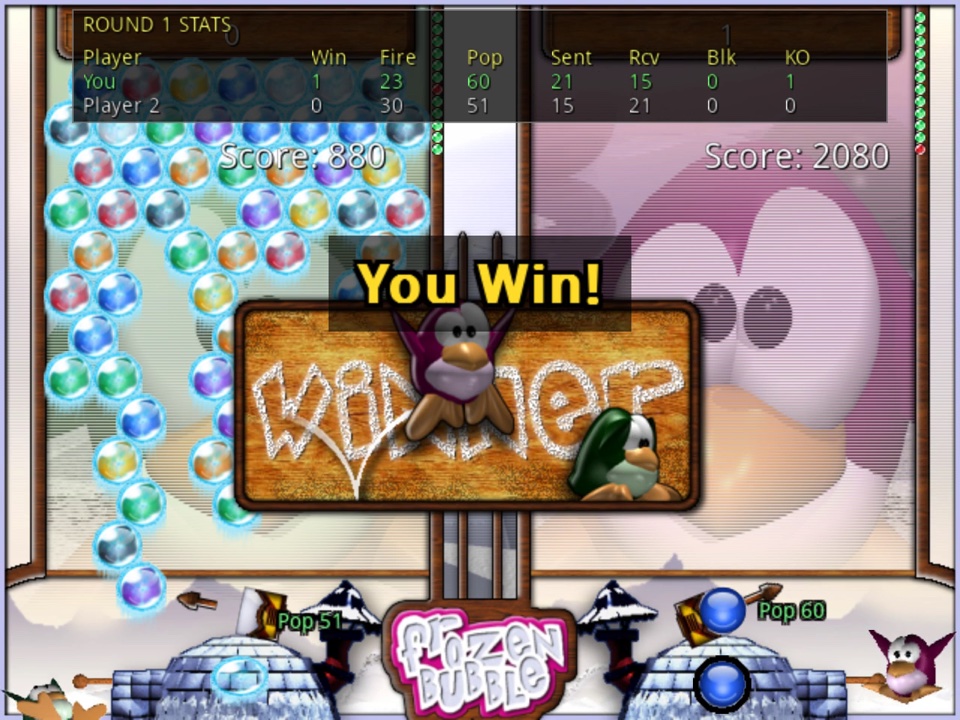
Frozen Bubble was at its best as a two-player game, and this version keeps that at its heart: two to five players on one computer, or up to twenty in an online room. This page explains how a multiplayer round works, how attacks are sent and received, and how to find a game.
Every player gets their own board, filled with the same starting pattern, and plays the same game as in 1-player mode: aim, fire, pop groups of three or more, drop what hangs below them. Two things are different.
First, instead of the ceiling being pushed down, a new row of bubbles is added to the top of your board every so many shots. The default is twelve, as in the original game; the host can set it to 15 or 20 for a slower game, or turn it off per player as a handicap. A row of dots beside each board counts down to the next one.
Second, and more importantly, you can attack. In a Classic round you lose when a bubble on your board crosses the bottom line, and the last player (or team) still alive wins the round. The first to win the agreed number of rounds takes the match.
Every shot that pops something can send attack bubbles, sometimes called malus, to your opponents. The number is simple: the bubbles you popped, plus the bubbles that fell, minus two. Popping a plain group of three sends one; popping three that drops ten more sends eleven.
Attack bubbles wait a moment and then fall into the target's board in a wave, each one landing in a random column. At most seven fall at once; the rest queue for the next wave. Your opponent's board shows the queue building up, so both of you know what is coming.
The host chooses one of three attack settings for the room:
With five or fewer players still alive, an attack is split evenly between every living opponent, rounded up. With six or more alive, splitting one big drop across so many boards would make every shot an attack on everyone, so the whole attack goes to a single opponent instead: the one you have targeted, or a random living player if you have not picked anyone. The rule is judged on how many players are alive at that moment, so a large room switches back to splitting as it thins out. In a team game your attacks never hit your own team.
With chain reactions on, a bubble that falls from your board can still do work on the way down. If there is an open spot where that falling bubble would complete a group of its own colour, it flies up into that spot and pops the group, which can drop more bubbles, which can chain again. Chains score a growing multiplier and send bigger attacks. With chain reactions off the game is quieter and easier to predict.
Classic is described above. Three other modes change what wins a round: Clear (first to empty their own board), Race (first to pop a target number of bubbles, 50 by default) and Timed (most bubbles popped when the clock runs out, 30 seconds by default). Any of them can be played in teams. The game modes page describes them all.
Local multiplayer, the 2P button on the title screen, seats two to five players at one machine. Each player needs a set of keys or a gamepad; the default keys for players one and two are the arrow keys and X, C, V and D, and any gamepad can be assigned in the settings. Empty seats can be filled with bots at Low, Medium or High skill, so one person can play a full five-board game alone. Games above two players are newer and less tested than the two-player game.
NET GAME on the title screen lists the public servers, which are run by the community rather than by the developer, and shows each one's ping. Pick one, choose a name, and you arrive in the lobby: a world map of who is online, a list of open rooms, and a chat. Create a room to become its host or join one that is waiting.
The host sets the rules, and everyone in the room sees them change live: game mode, attack setting, chain reactions, the number of round wins needed, and a grid of per-player options for the number of colours (five to eight), the new-row setting, the aim guide and teams. The host can also add bots and use Set Teams to split the room into two to five teams with one tap.
Rooms hold up to twenty players. Above five, the screen shows your own board large with the opponents that matter most beside it, there are hotkeys to pick an attack target, and once you are knocked out you can watch the rest of the round.
Tournaments are single-elimination brackets for four to sixteen players, each match best of three. Anyone can create one from the lobby and set one ruleset for every match.
LAN GAME finds servers on your local network, and anyone can run a server
of their own: it is the same fb-server as the original game's, so this
version and the original Linux game can share one.
Chat is not moderated by the developer. Press B in the lobby or a room, tap REPORT / BLOCK above the chat, or tap a player's chat line to open a list of players. Block hides that player's messages on your own device straight away. Report sends a note to the operator of that server. The host of a room can also remove a player from it.
Servers keep weekly rankings of round wins, round losses and bubbles popped, which reset every Monday at 00:00 UTC. Bots and tournament rounds do not count. The rankings are in the lobby and on the Weekly rankings page. The project's Discord gets an alert when someone connects and a summary of every round, which makes it a good place to find an opponent.